by
by Summary Box: A Deleted WhatsApp Message Recovery App can use Android notification access to save incoming message notifications before they disappear. This guide explains how these apps work, what they can recover, their limitations and the privacy permissions you should check.
What Is a Deleted WhatsApp Message Recovery App?
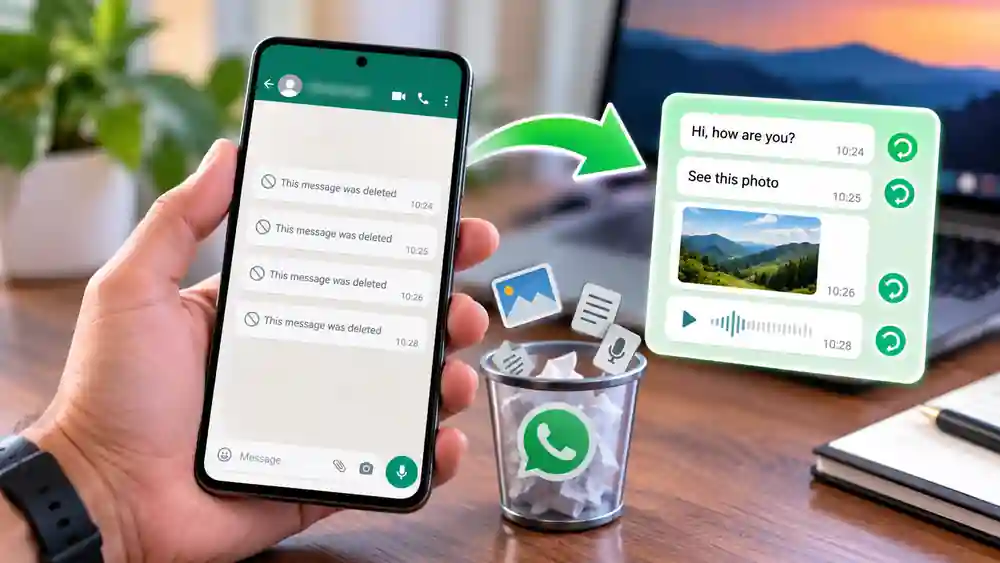
A Deleted WhatsApp Message Recovery App is designed to keep a copy of message content that appears in your Android notifications. If a sender later deletes the message, some apps can display the notification copy that was already saved on your phone. They generally do not retrieve deleted messages directly from WhatsApp servers or bypass WhatsApp encryption. Current Google Play listings for several recovery apps describe this notification-based approach.
Android itself also provides a Notification History feature on supported devices. Google says it can show recently dismissed notifications and the day’s notification history, although availability and settings can vary between devices.
Deleted WhatsApp Message Recovery App: 7 Useful Features
1. Save Incoming Notifications
The main purpose is to record supported notifications when they arrive. This means the app needs access to notifications before a message is deleted.
2. View Deleted Text Messages
If a WhatsApp message appeared in a notification and was saved beforehand, some apps can show the captured text after the sender deletes the original message. This is why these apps are more accurately described as notification recovery tools rather than server-level recovery tools.
3. Recover Supported Photos and Videos
Some apps advertise recovery of images, videos and other media shown through notifications. However, media recovery is not guaranteed. It can depend on whether the media was downloaded and made available to the notification before deletion.
4. Keep a Notification History
Beyond deleted messages, these apps can function as notification-history tools. You may be able to browse previously received alerts and find information that was accidentally dismissed.
5. Support WhatsApp Business
Some current Android recovery apps also list WhatsApp Business among their supported applications. Support can vary by app and Android version, so check the individual app’s current listing before installing it.
6. Work Without Root Access
Several current apps state that they work without rooting the Android phone because their recovery method depends on notification access rather than direct access to WhatsApp’s internal database.
7. Offer Local Message Storage
Some apps state that recovered notification content is stored locally on the phone. However, privacy practices differ between developers, so always review the app’s Data Safety information and privacy policy before granting notification access.
How to Use a Deleted Message Recovery App
Table of Contents
The usual setup is simple:
- Install a trusted notification-recovery app.
- Open the app and complete its initial setup.
- Allow Notification Access when requested.
- Keep WhatsApp notifications enabled.
- Receive messages normally.
- Open the recovery app when you need to check saved notifications.
The exact permission names can differ between Android versions and phone brands. Google also notes that notification settings vary by device.
When Can Message Recovery Fail?
A recovery app cannot magically retrieve every deleted message. Messages received before the app was installed, notifications that were disabled, muted chats that produced no notification, or content that never reached the notification system may not be recoverable. Some apps also warn that messages received while you are already viewing a chat may not generate the notification needed for capture.
Privacy is another important consideration. Notification access can expose message previews and other notifications to an app. Therefore, users should install apps carefully and check what permissions and data practices the developer declares.
Frequently Asked Questions
Can I recover a WhatsApp message deleted before installing the app?
Generally, no. Notification-based recovery requires the message notification to have been received and captured first.
Does the app recover messages directly from WhatsApp?
No. These tools generally rely on Android notifications rather than accessing WhatsApp’s servers or database.
Can deleted photos and videos always be recovered?
No. Media recovery depends on the notification and whether the media was available to the device before deletion.
Is Notification Access safe to give?
It is a sensitive permission because notifications can contain private information. Review the developer, privacy policy and Data Safety details before granting access.
Can Android recover dismissed notifications without an app?
On supported devices, Android’s built-in Notification History can show recently dismissed notifications. Availability varies by device and settings.
Conclusion
A Deleted WhatsApp Message Recovery App can be useful when you want to keep a record of notifications that may later disappear from a chat. However, it does not guarantee recovery of every deleted message. Notification settings, installation time, media availability and app permissions all affect how well it works. For privacy, always choose carefully and understand exactly what notification access allows before enabling it.
Internal Link Suggestion:
Phone Screen Hider: 7 Amazing & Powerful Privacy Features to Know
Official External Links:
Google Android Notification Help
Google Play – Recover Deleted Messages: WAWR