by
by Summary Box: Touch Notch turns the camera cutout on compatible Android phones into a customizable shortcut area. This guide explains its useful actions, gesture controls, setup process, privacy details and Android download option.
What Is Touch Notch?
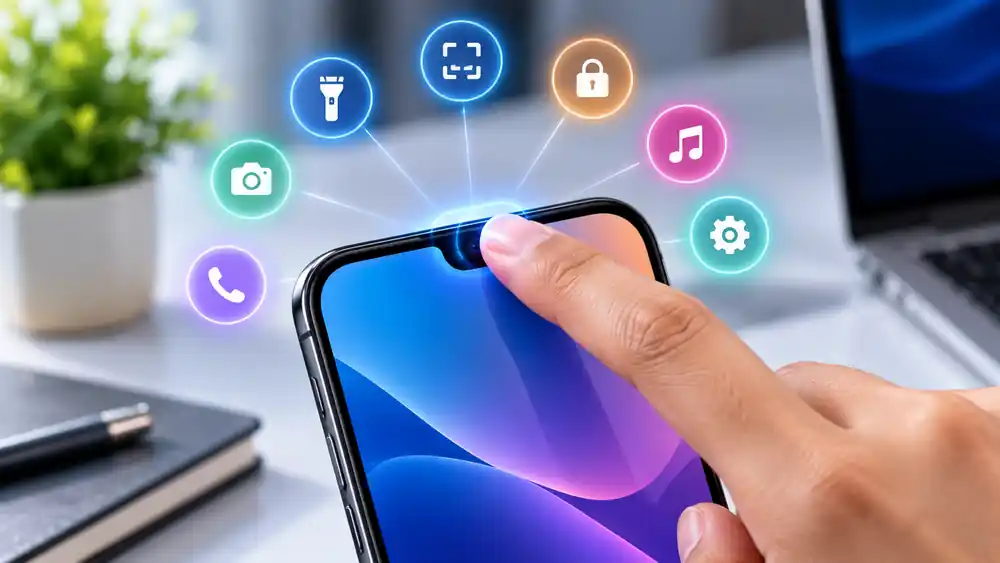
Touch Notch is an Android utility app that lets users assign actions to the area around the phone’s camera cutout or notch. Instead of leaving that space unused, users can configure gestures such as a single tap, double tap, long press, swipe left or swipe right to perform selected actions. The app is listed on Google Play by Mini Mobile Tools and was updated in August 2025.
The idea is useful for people who want faster access to everyday phone controls without repeatedly opening menus. Depending on the selected settings and device compatibility, the notch area can be used for screenshots, flashlight control, camera access, screen locking, media controls and other shortcuts.
Touch Notch Features You Should Know
1. Custom Notch Gestures
Different gestures can be assigned to different actions. You can configure a single touch, double touch, long touch, swipe left or swipe right according to your preferred shortcuts. This allows several actions to be placed around one small area.
2. Quick Screenshot and Flashlight
The app can provide quick access to screenshot capture and flashlight controls. These shortcuts can be useful when you want to perform an action without searching through notification panels or system menus.
3. Easy Phone Controls
Available actions include opening the power menu, locking the screen, changing ringer modes and controlling Do Not Disturb settings. These options can reduce the need to repeatedly use physical buttons for common tasks.
4. Launch Apps and Camera
Users can configure the notch area to open the camera or launch a selected application. The app also supports access to recent apps and the home screen, making the camera cutout a convenient navigation point.
5. Music and Website Shortcuts
The available actions also include play, pause, previous and next track controls. Users can additionally configure shortcuts for selected websites, QR or barcode scanning and quick dialing.
How to Set Up Touch Notch
Setting up the app is straightforward:
- Install the app from its official Google Play listing.
- Open the app and review the available gesture options.
- Enable the required Accessibility Service.
- Position the invisible touch area around your camera cutout.
- Select an action for each available gesture.
- Test the gestures and adjust the position if necessary.
The app states that its Accessibility Service is used to create an invisible button around the camera cutout for user-selected actions.
Is Touch Notch Safe to Use?
The Google Play listing says the app uses Android Accessibility Service API for its shortcut functionality. However, its current Play Store data-safety section also states that the developer may share app information/performance and device or other IDs with third parties, while listing some collected data types. Users should review the latest Play Store privacy information and permissions before installation.
Frequently Asked Questions
What is Touch Notch?
It is an Android utility that turns the camera cutout or notch area into a customizable shortcut control.
Can Touch Notch take screenshots?
Yes. Screenshot capture is listed among its supported actions.
Can it control music?
Yes. The listed media controls include play/pause, previous track and next track actions.
Does it work on every Android phone?
Compatibility can vary depending on the phone’s camera-cutout design and Android implementation. Check the app’s current Play Store information before installing.
Table of Contents
Where can I download it?
The app is available through its official Google Play listing for Android.
CLICK HERE TO INSTALL THE APP
Conclusion
Touch Notch offers an interesting way to make the camera cutout more useful by connecting it with customizable gestures and everyday shortcuts. If your Android phone has a compatible notch or camera cutout, you can try configuring different actions and see which shortcuts fit your daily use.
Internal Link Suggestion:
PM Internship Scheme 2026
Official External Link(s):
Touch Notch – Official Google Play Listing