by
by Parts of a Computer and Their Functions Explained
Understanding the Parts of a Computer and Their Functions is essential for every beginner. This guide explains each computer component in simple language.Computers have become an essential part of our daily lives.
Whether you are a student, office worker, gamer, or business owner, understanding the parts of a computer and their functions helps you use your device more effectively. Every computer consists of several components that work together to process data, store information, and display results.
In this guide, you will learn about the most important computer parts, how they function, and why each component is necessary for smooth system performance.
What Is a Computer?
A computer is an electronic device that accepts input, processes data, stores information, and produces output. It performs millions of calculations every second using both hardware and software.
Modern computers are used for education, business, entertainment, programming, graphic design, online communication, and much more.
Table of Contents
What Are the Parts of a Computer?
Computer parts are the physical components that work together to operate a computer system. Some parts are located inside the computer case, while others are external devices connected through ports or wireless technology.
Let’s explore the Parts of a Computer and Their Functions one by one to understand how every hardware component works together.
These components can be divided into two categories:
- Internal Parts
- External Parts
Let’s explore each one in detail.
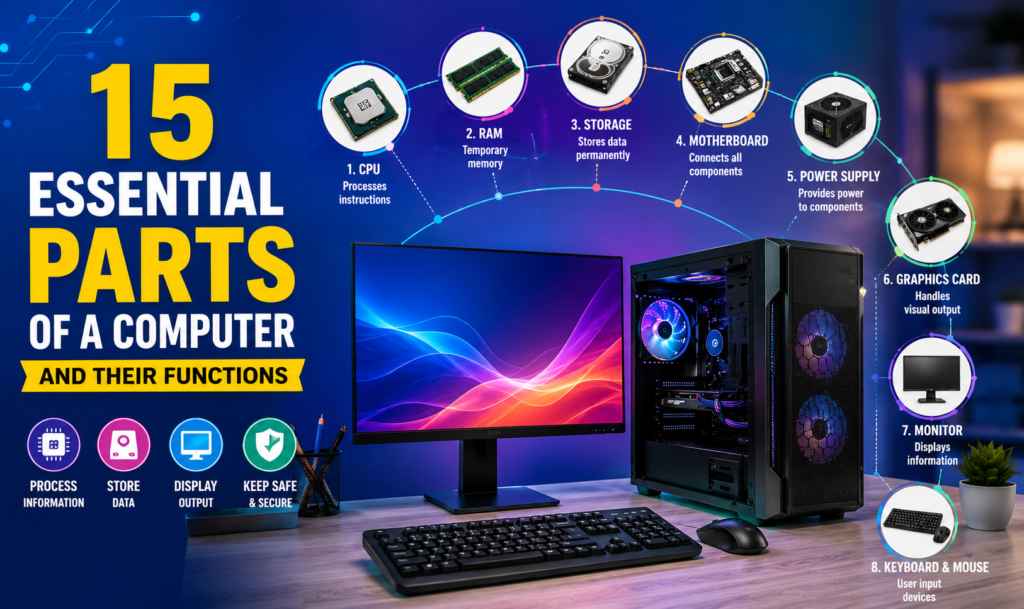
15 Essential Parts of a Computer and Their Functions
1. Central Processing Unit (CPU)
The CPU (Central Processing Unit) is known as the brain of the computer. It processes instructions, performs calculations, and controls almost every task carried out by the system. A faster CPU allows applications to run more efficiently and improves overall performance.
2. Motherboard
The motherboard is the main circuit board of a computer. It connects all essential components such as the CPU, RAM, storage devices, graphics card, and power supply. Without a motherboard, the computer cannot function because it enables communication between all hardware.
3. Random Access Memory (RAM)
RAM is temporary memory used to store data while programs are running. More RAM allows users to open multiple applications simultaneously and improves system speed. Unlike storage drives, RAM loses its data when the computer is turned off.
4. Read Only Memory (ROM)
ROM contains permanent instructions required to start the computer. These instructions remain stored even when the computer is powered off. It plays a vital role during the boot process.
5. Storage Drive (HDD or SSD)
A storage drive permanently saves the operating system, software, files, photos, videos, and documents.
- HDD offers larger storage at a lower cost.
- SSD provides significantly faster speed, lower power consumption, and better reliability.
Today, SSDs are the preferred choice for modern computers.
6. Graphics Processing Unit (GPU)
The GPU handles image rendering, video processing, animations, and gaming graphics. While basic computers use integrated graphics, dedicated graphics cards deliver much better performance for gaming, video editing, 3D design, and AI applications.
7. Power Supply Unit (PSU)
The Power Supply Unit converts AC electricity from the wall socket into DC power required by the computer’s internal components. A reliable PSU ensures stable performance and protects hardware from power fluctuations.
8. Cooling Fan
As the CPU and GPU generate heat during operation, cooling fans help maintain safe temperatures. Proper cooling improves performance, prevents overheating, and extends the lifespan of computer components.
9. Keyboard
The keyboard is one of the most important input devices used to enter text, numbers, and commands into a computer. Modern keyboards include function keys, shortcut keys, and multimedia controls that improve productivity.
10. Mouse
A mouse allows users to control the cursor, select files, open applications, drag objects, and navigate through the operating system. Optical and wireless mice are the most commonly used today.
11. Monitor
The monitor is the primary output device that displays text, images, videos, and software interfaces. Modern monitors come in Full HD, 2K, and 4K resolutions, providing better picture quality and improved viewing comfort.
12. Printer
A printer converts digital documents into physical copies. Inkjet printers are ideal for home users, while laser printers are preferred in offices because of their speed and lower printing cost.
13. Scanner
A scanner captures printed documents or photographs and converts them into digital files. It is widely used in offices, schools, hospitals, and businesses for document management.
14. Speakers
Speakers are output devices that produce sound from a computer. They are used for listening to music, watching videos, attending online meetings, and gaming. Many modern monitors and laptops also include built-in speakers.
15. Network Interface Card (NIC)
A Network Interface Card (NIC) connects a computer to the internet or a local network. It can be wired (Ethernet) or wireless (Wi-Fi). Without a network adapter, a computer cannot communicate with other devices over a network.
Internal Parts of a Computer
Internal components are installed inside the computer cabinet and work together to process data efficiently.
| Internal Part | Function |
|---|---|
| CPU | Processes instructions |
| Motherboard | Connects all hardware |
| RAM | Temporary memory |
| ROM | Stores startup instructions |
| SSD/HDD | Permanent storage |
| GPU | Processes graphics |
| PSU | Supplies electrical power |
| Cooling Fan | Prevents overheating |
External Parts of a Computer
External components are connected outside the computer and allow users to interact with the system.
| External Part | Function |
|---|---|
| Keyboard | Data input |
| Mouse | Cursor control |
| Monitor | Displays output |
| Printer | Prints documents |
| Scanner | Scans documents |
| Speakers | Audio output |
Hardware vs Software
Learning the Parts of a Computer and Their Functions also makes it easier to understand the difference between hardware and software.
| Hardware | Software |
|---|---|
| Physical components | Programs and applications |
| Can be touched | Cannot be touched |
| CPU, RAM, Keyboard | Windows, MS Office, Chrome |
| Manufactured | Developed through programming |
Both hardware and software are essential for a computer to function properly.
Tips to Maintain Computer Parts
To keep your computer running smoothly:
- Clean dust from the CPU cabinet and cooling fans regularly.
- Install antivirus software to protect your system.
- Update Windows and drivers frequently.
- Avoid sudden power cuts by using a UPS.
- Remove unnecessary files to free up storage space.
- Keep your computer in a cool and well-ventilated area.
- Handle external devices carefully to avoid physical damage.
Proper maintenance increases the lifespan and performance of your computer.
Frequently Asked Questions (FAQs)
1. What is the most important part of a computer?
The CPU (Central Processing Unit) is considered the brain of the computer because it processes instructions and controls all major operations.
2. What are the main parts of a computer?
The main parts include the CPU, motherboard, RAM, storage drive (SSD/HDD), power supply, monitor, keyboard, and mouse.
3. What is the difference between RAM and ROM?
RAM is temporary memory used while the computer is running, whereas ROM stores permanent startup instructions and retains data even when the power is off.
4. Why is an SSD better than an HDD?
An SSD is faster, more reliable, quieter, and consumes less power than a traditional HDD, making it the preferred storage option for modern computers.
5. Which devices are input and output devices?
Input devices include the keyboard, mouse, and scanner. Output devices include the monitor, printer, and speakers.
Conclusion
Understanding the parts of a computer and their functions is essential for anyone using a desktop or laptop. Every component, from the CPU and motherboard to the keyboard and monitor, plays a specific role in ensuring the computer operates efficiently. Learning about these components not only improves your technical knowledge but also helps you troubleshoot basic issues,
choose the right hardware, and maintain your system for long-term performance.We hope this guide helped you understand the Parts of a Computer and Their Functions. Whether you are a student or beginner, learning the Parts of a Computer and Their Functions builds a strong foundation for improving your computer knowledge.
Whether you are a student, beginner, or professional, having a clear understanding of computer hardware provides a strong foundation for learning advanced computer skills.
Read More : https://www.computric.in/aadhaar-address-change-online-2026/