by
by Summary Box: A High Volume App can help increase your phone’s audio output for music, videos, games, calls and notifications. This guide explains the main features of Increase High Volume Booster, how to use it and important safety points.
What Is a High Volume App?
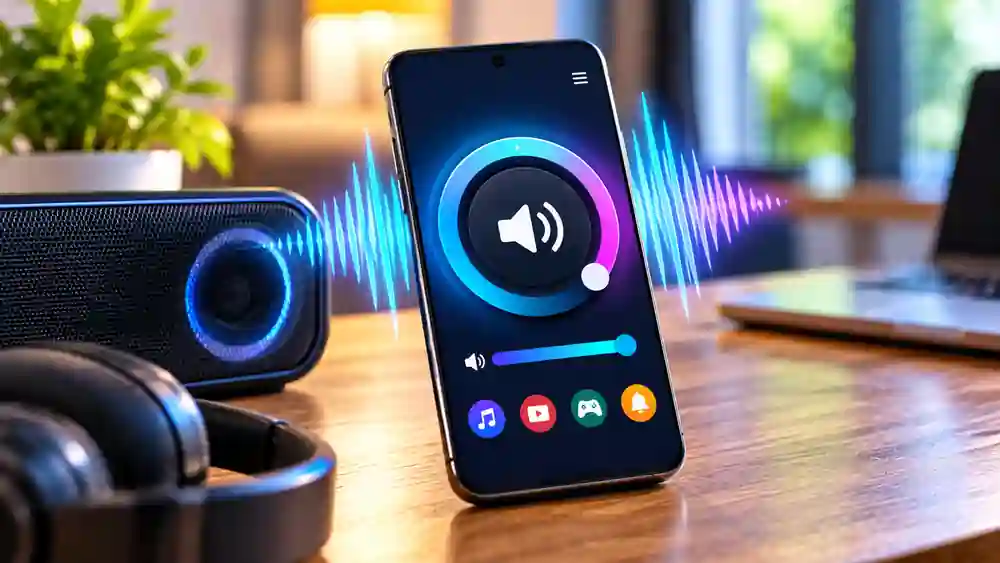
A High Volume App is designed for users who feel their phone’s normal audio level is not loud enough. Increase High Volume Booster by Tech Nukti Media is an Android audio app that claims to boost sound beyond the device’s standard level, with controls for music, movies, games, calls, alarms and notifications. Its Google Play listing currently shows 500K+ downloads and a 4.5-star rating from more than 11,000 reviews.
The app is aimed at situations where built-in speaker volume feels too low, such as watching videos in a noisy environment or listening to music without headphones. The developer also warns that excessive volume can damage hearing, so higher settings should be used carefully.
High Volume App: 7 Features You Should Know
1. Volume Boost Up to 200%
The app advertises volume enhancement of up to 200%, giving users an additional boost beyond the normal volume control. The actual result can vary depending on the phone, speaker hardware and audio source.
2. One-Tap Sound Control
Instead of searching through several phone settings, the app provides a simple control for applying its sound boost. This can make it convenient when you quickly want louder audio while watching videos or listening to music.
3. Built-In Music Player
The app includes a music player and describes support for enhanced clarity and bass. This makes it useful for users who want to play local music while experimenting with the available sound enhancement options.
4. Music, Videos and Games
Table of Contents
A High Volume App can be useful across different entertainment types. The listing specifically mentions music, movies and games, so users can try the boost while consuming different forms of media.
5. Alarms and Notifications
The app also advertises enhancement for alarms and notifications. This can be useful when standard alert sounds are difficult to hear, although the effect depends on the device and its audio system.
6. Lightweight Design
According to the developer’s listing, the app is designed to be lightweight and optimized for low battery and RAM usage. It does not require root access, making installation simpler for ordinary Android users.
7. Theme Options
The current Play Store description mentions multiple stylish color themes. These mainly affect the app’s appearance rather than the actual audio output, but they provide some customization for the interface.
How to Use a High Volume App
Using the app is relatively straightforward:
- Install Increase High Volume Booster from Google Play.
- Open the app and check the available volume control.
- Start with a moderate boost rather than immediately selecting the maximum.
- Play music or a video and adjust the level according to your device.
- Reduce the volume if the sound becomes distorted or uncomfortable.
The app’s developer specifically recommends gradually increasing the volume and using it responsibly because prolonged loud audio can affect hearing.
Is This High Volume App Free?
The Google Play listing shows the app as free to install, while also indicating that it contains ads and in-app purchases. Its current listing shows Android availability; I could not verify an official iOS version from the sources checked.
Frequently Asked Questions
Can a High Volume App make every phone louder?
Not necessarily. The result depends on the phone’s hardware, operating system and audio source. Software cannot guarantee the same boost on every device.
Does Increase High Volume Booster require root?
The developer’s Google Play description says root access is not required.
Can I use it for music and videos?
Yes. The official listing specifically mentions music, movies and games among its intended uses.
Is maximum volume safe?
Higher volume is not automatically safer. The developer warns that excessive volume may damage speakers or hearing, so moderate levels are preferable.
Conclusion
A High Volume App can be useful when your phone’s standard audio level feels insufficient. Increase High Volume Booster offers volume enhancement, a music player, one-tap controls and support for several audio uses. However, the actual improvement can differ between devices, so start with a moderate setting and avoid prolonged high-volume listening.
Internal Link Suggestion:
Ledger Wallet: 7 Powerful Features for Safer Crypto Management
Official External Link(s):
Increase High Volume Booster – Google Play
Tech Nukti Media Official Website