 by
by If your laptop feels slow while starting up, opening applications, or transferring files, upgrading to an SSD is one of the best ways to improve its performance. Whether you use your laptop for work, studies, gaming, programming, or content creation, installing the Best SSD for Laptop in India can make a significant difference in speed and responsiveness.
Unlike traditional hard disk drives (HDDs), Solid State Drives (SSDs) use flash memory instead of spinning disks. This allows them to access data much faster, resulting in quicker boot times, faster software launches, smoother multitasking, and improved overall performance. Even an older laptop can feel almost new after upgrading from an HDD to a quality SSD.
Today, SSDs are available in different types, including SATA SSDs and NVMe SSDs. SATA SSDs provide a noticeable improvement over HDDs and are ideal for older laptops, while NVMe SSDs offer much higher read and write speeds for newer systems with M.2 PCIe support.
With so many SSD brands available, choosing the right one can be confusing. Factors such as storage capacity, interface, speed, endurance, warranty, and price all play a role in selecting the best option. Some SSDs focus on affordability, while others prioritize maximum performance for gaming and professional workloads.
In this comprehensive guide, we compare the Best SSD for Laptop in India, including the latest NVMe and SATA SSDs from trusted brands such as Samsung, Western Digital, Crucial, Kingston, Lexar, and TeamGroup. We will also explain the differences between SATA and NVMe SSDs, discuss compatibility, and help you choose the right SSD based on your budget and usage.
By the end of this article, you’ll know exactly which SSD is best for your laptop and whether an NVMe or SATA SSD is the right upgrade for your needs
Table of Contents
What Is an SSD?
A Solid State Drive (SSD) is a storage device that uses NAND flash memory to store data permanently. Unlike a Hard Disk Drive (HDD), an SSD has no moving mechanical parts.Best SSD for Laptop in India This makes it faster, quieter, more durable, and more energy-efficient.
If you are looking for the Best SSD for Laptop in India, choosing the right solid-state drive can dramatically improve your laptop’s overall performance. The Best SSD for Laptop in India offers faster boot times, quicker application launches, smoother multitasking, and significantly improved file transfer speeds compared to traditional hard drives. Whether you are a student, gamer, programmer, content creator, or business professional, investing in the Best SSD for Laptop in
India is one of the most effective upgrades you can make. Modern NVMe SSDs deliver exceptional read and write speeds for demanding tasks such as gaming, video editing, and software development, while SATA SSDs remain an excellent and affordable option for older laptops. Before purchasing the Best SSD for Laptop in India,
it is important to consider compatibility, storage capacity, PCIe generation, endurance (TBW), warranty, and real-world performance. Leading brands such as Samsung, Western Digital, Crucial, Kingston, Lexar, and TeamGroup offer reliable SSDs with excellent speed, durability, and long-term value.
In this comprehensive guide, we compare the Best SSD for Laptop in India by analyzing specifications, benchmark performance, pricing, gaming capabilities, productivity, and overall value for money.
Whether you need a high-speed NVMe SSD for professional workloads or a budget-friendly SATA SSD to breathe new life into an older laptop, this article will help you choose the Best SSD for Laptop in India that perfectly matches your needs and budget.
When you turn on your laptop, the SSD loads the operating system much faster than a traditional hard drive. Applications open almost instantly, file transfers complete more quickly, and the entire system feels smoother.
Modern SSDs are now the standard storage solution in most new laptops because they provide significantly better performance and reliability.
Why Upgrade Your Laptop to an SSD?
Replacing an HDD with the Best SSD for Laptop in India is one of the most cost-effective upgrades you can make.
Faster Boot Time
An SSD can reduce Windows startup time from over a minute to just a few seconds, allowing you to begin working almost immediately.
Faster Application Loading
Programs such as:
- Microsoft Office
- Adobe Photoshop
- Adobe Premiere Pro
- Visual Studio Code
- Google Chrome
- Microsoft Edge
open much faster when installed on an SSD.
Better Multitasking
SSDs improve responsiveness while switching between applications, opening multiple browser tabs, and working with large files.
Improved Gaming Experience
Although an SSD does not directly increase FPS, it reduces game loading times, speeds up level loading, and improves texture streaming in many modern games.
Better Battery Life
Because SSDs consume less power than mechanical hard drives, laptops often achieve slightly longer battery life after upgrading.
Greater Reliability
Without spinning disks or moving read/write heads, SSDs are more resistant to accidental drops and vibrations, making them ideal for portable laptops.
Types of SSDs
Understanding SSD types is important before purchasing one.
1. SATA SSD
SATA SSDs are the most common upgrade for older laptops.
They use the SATA interface, which limits maximum speeds to around 550 MB/s.
Advantages:
- Affordable
- Easy to install
- Compatible with many older laptops
- Reliable performance
- Excellent upgrade from HDD
Best For:
- Students
- Office users
- Everyday computing
- Older laptops
2. NVMe SSD
NVMe SSDs use the PCIe interface instead of SATA.
This allows much higher read and write speeds, often exceeding 3,500 MB/s and even 7,000 MB/s on premium models.
Advantages:
- Extremely fast performance
- Excellent multitasking
- Faster game loading
- Better content creation performance
- Ideal for professionals
Best For:
- Gamers
- Programmers
- Video editors
- Graphic designers
- Power users
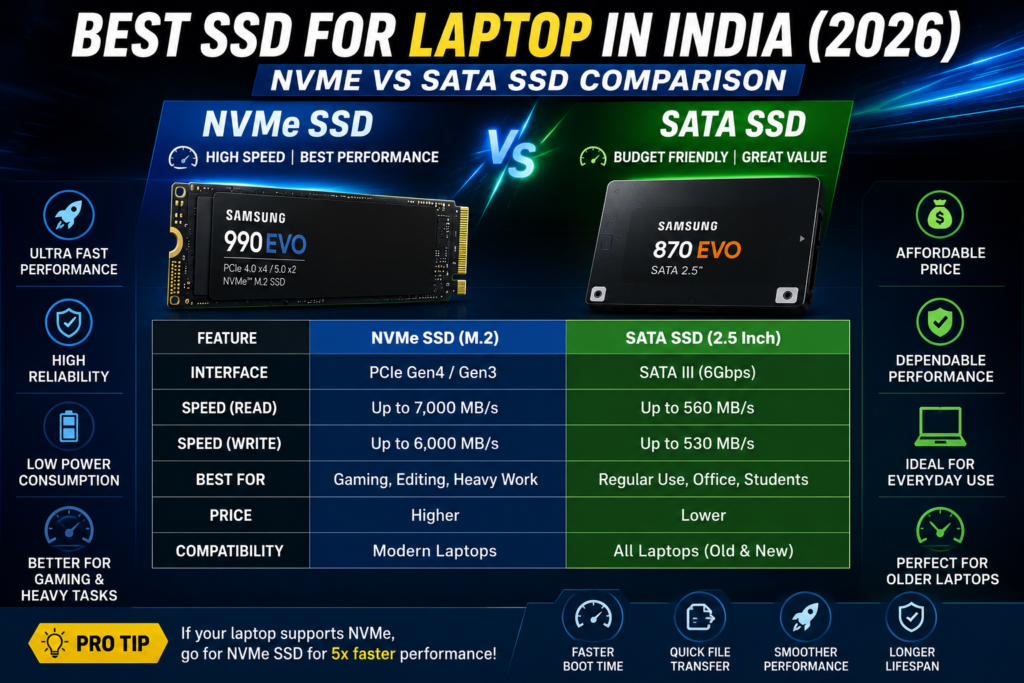
SATA SSD vs NVMe SSD
Many buyers ask whether SATA SSD or NVMe SSD is the better choice.
| Feature | SATA SSD | NVMe SSD |
|---|---|---|
| Interface | SATA | PCIe |
| Maximum Speed | Around 550 MB/s | Up to 7,000 MB/s |
| Boot Time | Fast | Very Fast |
| Gaming Load Times | Good | Excellent |
| Video Editing | Good | Excellent |
| Multitasking | Good | Excellent |
| Price | Lower | Higher |
| Best For | Everyday Users | Professionals & Gamers |
If your laptop supports NVMe drives, they generally provide much better performance. However, a SATA SSD is still a massive improvement over a traditional HDD and remains an excellent choice for budget-conscious users.
How to Choose the Best SSD for Your Laptop
Before buying an SSD, consider these important factors:
1. Compatibility
Check whether your laptop supports:
- 2.5-inch SATA SSD
- M.2 SATA SSD
- M.2 NVMe SSD
Not every laptop supports NVMe storage, so verify compatibility in your laptop’s specifications or user manual.
2. Storage Capacity
Common SSD capacities include:
- 256GB
- 500GB
- 1TB
- 2TB
For most users, 500GB provides a good balance of storage space and price. Gamers, content creators, and professionals may benefit from 1TB or larger capacities.
3. Read and Write Speed
Higher speeds improve:
- Windows startup
- Software loading
- File transfers
- Video editing
- Game loading times
If performance is your priority, choose a high-speed NVMe SSD.
4. Endurance (TBW)
TBW (Terabytes Written) measures how much data can be written to an SSD over its lifetime.
A higher TBW rating generally indicates better durability, Best SSD for Laptop in India especially for users who frequently edit videos, transfer large files, or perform intensive workloads.
5. Warranty
Most reputable SSD manufacturers offer warranties ranging from 3 to 5 years.
Always choose a well-known brand that provides reliable warranty support and firmware updates.
6. Brand Reputation
Trusted SSD brands include:
- Samsung
- Western Digital (WD)
- Crucial
- Kingston
- Lexar
- TeamGroup
These brands are known for delivering reliable performance, quality components, and dependable customer support.
Best SSD for Laptop in India (2026): Top NVMe & SATA SSDs Compared
Top 10 Best SSDs for Laptop in India (2026)
Choosing the Best SSD for Laptop in India depends on your budget, laptop compatibility, and performance requirements. Some SSDs are designed for everyday users who need a reliable storage upgrade, while others are built for gamers, content creators, and professionals who demand maximum speed.
Below are the top SSDs available in India in 2026.
1. Samsung 990 EVO – Best Overall SSD
The Samsung 990 EVO is one of the most balanced SSDs available for laptop users.Best SSD for Laptop in India It offers outstanding speed, excellent reliability, and impressive power efficiency, making it suitable for students, professionals, gamers, and creators.
Samsung’s advanced controller and NAND technology deliver consistently fast performance, whether you are booting Windows, launching software, editing videos, or transferring large files.
Specifications
- Interface: PCIe Gen4 x4 / Gen5 x2
- Form Factor: M.2 2280
- Capacity: 1TB / 2TB
- Read Speed: Up to 5,000 MB/s
- Write Speed: Up to 4,200 MB/s
- Warranty: 5 Years
Pros
- Excellent overall performance
- Very reliable
- Low power consumption
- Long warranty
- Great thermal efficiency
Cons
- Slightly expensive
- Requires NVMe support
2. WD Black SN770 – Best for Gaming
The WD Black SN770 is an outstanding NVMe SSD designed for gamers and power users.
Games load significantly faster, Windows boots quickly, and applications feel highly responsive. It also performs exceptionally well in video editing and programming workloads.
Specifications
- Interface: PCIe Gen4
- Capacity: 500GB / 1TB / 2TB
- Read Speed: Up to 5,150 MB/s
- Write Speed: Up to 4,900 MB/s
- Warranty: 5 Years
Pros
- Excellent gaming performance
- High endurance
- Fast loading times
- Reliable brand
- Competitive pricing
Cons
- No DRAM cache
- Not ideal for older laptops
3. Crucial P3 Plus – Best Budget NVMe SSD
If you’re looking for an affordable NVMe upgrade, the Crucial P3 Plus offers excellent value.
It delivers significantly faster performance than SATA SSDs while remaining budget-friendly.
Specifications
- Interface: PCIe Gen4
- Capacity: 500GB / 1TB / 2TB / 4TB
- Read Speed: Up to 5,000 MB/s
- Write Speed: Up to 4,200 MB/s
- Warranty: 5 Years
Pros
- Affordable
- Excellent performance
- Good reliability
- Easy installation
- Low power consumption
Cons
- Write speed decreases during very large file transfers
- Not designed for heavy enterprise workloads
4. Samsung 870 EVO – Best SATA SSD
The Samsung 870 EVO remains one of the best SATA SSDs for older laptops.
Although SATA technology is slower than NVMe, it still provides a dramatic improvement over traditional HDDs.
Specifications
- Interface: SATA III
- Capacity: 250GB / 500GB / 1TB / 2TB / 4TB
- Read Speed: Up to 560 MB/s
- Write Speed: Up to 530 MB/s
- Warranty: 5 Years
Pros
- Extremely reliable
- Excellent lifespan
- Easy upgrade
- Perfect for older laptops
- Stable performance
Cons
- Slower than NVMe SSDs
- Higher price compared to some SATA competitors
5. Kingston NV3 – Best Value NVMe SSD
The Kingston NV3 is an excellent option for users who want strong NVMe performance without spending a premium.
It is ideal for students, office workers, programmers, and everyday laptop users.
Specifications
- Interface: PCIe Gen4
- Capacity: 500GB / 1TB / 2TB
- Read Speed: Up to 6,000 MB/s
- Write Speed: Up to 5,000 MB/s
- Warranty: 5 Years
Pros
- Outstanding value
- Fast boot speed
- Excellent multitasking
- Reliable performance
- Good thermal management
Cons
- Performance depends on workload
- Premium models are faster
SSD Comparison Table
| SSD | Type | Max Read Speed | Max Write Speed | Best For |
|---|---|---|---|---|
| Samsung 990 EVO | NVMe | 5,000 MB/s | 4,200 MB/s | Overall Performance |
| WD Black SN770 | NVMe | 5,150 MB/s | 4,900 MB/s | Gaming |
| Crucial P3 Plus | NVMe | 5,000 MB/s | 4,200 MB/s | Budget Users |
| Samsung 870 EVO | SATA | 560 MB/s | 530 MB/s | Older Laptops |
| Kingston NV3 | NVMe | 6,000 MB/s | 5,000 MB/s | Best Value |
Which SSD Should You Choose?
Students
Recommended:
Kingston NV3 or Crucial P3 Plus
Both provide fast performance at an affordable price.
Office Users
Recommended:
Samsung 870 EVO
Excellent reliability and smooth everyday performance.
Gamers
Recommended:
WD Black SN770
Fast loading times and consistent gaming performance.
Programmers
Recommended:
Samsung 990 EVO
Excellent multitasking and fast project compilation.
Video Editors
Recommended:
Samsung 990 EVO
High-speed storage significantly improves editing workflows and file transfers.
Why NVMe SSDs Are Becoming More Popular
Modern laptops increasingly support PCIe Gen4 NVMe SSDs, allowing users to experience dramatically faster storage performance than SATA drives.
Benefits include:
- Faster Windows boot times
- Near-instant application launches
- Reduced game loading times
- Quicker file transfers
- Better responsiveness during multitasking
- Improved performance in video editing and creative workloads
While SATA SSDs remain an excellent option for older laptops, NVMe SSDs are the preferred choice for new systems that support the PCIe interface
Best SSD for Laptop in India (2026): Top NVMe & SATA SSDs Compared
6. WD Blue SN580 – Best SSD for Everyday Performance
The WD Blue SN580 is one of the most popular NVMe SSDs for students, professionals, and home users.Best SSD for Laptop in India It offers an excellent balance of speed, reliability, and affordability, making it a great upgrade for most modern laptops.
It delivers quick Windows boot times, fast application launches, and smooth multitasking without consuming excessive power.
Specifications
- Interface: PCIe Gen4 x4
- Form Factor: M.2 2280
- Capacity: 500GB / 1TB / 2TB
- Read Speed: Up to 4,150 MB/s
- Write Speed: Up to 4,150 MB/s
- Warranty: 5 Years
Pros
- Excellent value for money
- Reliable performance
- Energy efficient
- Fast Windows startup
- Trusted WD quality
Cons
- Not the fastest Gen4 SSD
- No DRAM cache
7. Crucial MX500 – Best SATA SSD for Reliability
The Crucial MX500 continues to be one of the best SATA SSDs for users upgrading older laptops that do not support NVMe storage.
Despite being limited by the SATA interface, it offers a huge performance improvement over traditional hard drives.
Specifications
- Interface: SATA III
- Form Factor: 2.5-inch
- Capacity: 250GB / 500GB / 1TB / 2TB
- Read Speed: Up to 560 MB/s
- Write Speed: Up to 510 MB/s
- Warranty: 5 Years
Pros
- Very reliable
- Excellent endurance
- Affordable
- Easy installation
- Stable long-term performance
Cons
- Limited by SATA speed
- Older technology
8. Kingston KC3000 – Best High-Performance NVMe SSD
The Kingston KC3000 is built for enthusiasts, gamers, video editors, and professionals who require extremely fast storage performance.
Large files transfer in seconds, and demanding applications load almost instantly.
Specifications
- Interface: PCIe Gen4
- Capacity: 512GB / 1TB / 2TB / 4TB
- Read Speed: Up to 7,000 MB/s
- Write Speed: Up to 7,000 MB/s
- Warranty: 5 Years
Pros
- Outstanding speed
- Excellent endurance
- Ideal for professionals
- Great thermal performance
- Premium quality
Cons
- Expensive
- Performance benefits depend on workload
9. Lexar NM790 – Best Value PCIe Gen4 SSD
The Lexar NM790 has become one of the best-value PCIe Gen4 SSDs by combining high-end performance with competitive pricing.
It is suitable for gaming, software development, video editing, and everyday computing.
Specifications
- Interface: PCIe Gen4
- Capacity: 1TB / 2TB / 4TB
- Read Speed: Up to 7,400 MB/s
- Write Speed: Up to 6,500 MB/s
- Warranty: 5 Years
Pros
- Excellent speed
- Competitive pricing
- Low power consumption
- Great gaming performance
- Strong overall value
Cons
- Availability varies
- Premium users may prefer Samsung
10. TeamGroup MP44L – Best Budget PCIe Gen4 SSD
The TeamGroup MP44L is an affordable Gen4 SSD that offers excellent everyday performance.
It is ideal for users upgrading from SATA SSDs or traditional hard drives without spending a premium.
Specifications
- Interface: PCIe Gen4
- Capacity: 500GB / 1TB / 2TB
- Read Speed: Up to 5,000 MB/s
- Write Speed: Up to 4,500 MB/s
- Warranty: 5 Years
Pros
- Excellent budget option
- Good overall speed
- Reliable everyday performance
- Low power usage
- Easy installation
Cons
- Not the fastest Gen4 SSD
- Heavy workloads reduce sustained write speeds
Complete SSD Performance Comparison
| SSD | Read Speed | Write Speed | Best For | Rating |
|---|---|---|---|---|
| Samsung 990 EVO | 5,000 MB/s | 4,200 MB/s | Overall | ⭐⭐⭐⭐⭐ |
| WD Black SN770 | 5,150 MB/s | 4,900 MB/s | Gaming | ⭐⭐⭐⭐⭐ |
| Crucial P3 Plus | 5,000 MB/s | 4,200 MB/s | Budget | ⭐⭐⭐⭐☆ |
| Samsung 870 EVO | 560 MB/s | 530 MB/s | SATA Upgrade | ⭐⭐⭐⭐⭐ |
| Kingston NV3 | 6,000 MB/s | 5,000 MB/s | Value | ⭐⭐⭐⭐⭐ |
| WD Blue SN580 | 4,150 MB/s | 4,150 MB/s | Daily Use | ⭐⭐⭐⭐☆ |
| Crucial MX500 | 560 MB/s | 510 MB/s | Older Laptops | ⭐⭐⭐⭐⭐ |
| Kingston KC3000 | 7,000 MB/s | 7,000 MB/s | Professionals | ⭐⭐⭐⭐⭐ |
| Lexar NM790 | 7,400 MB/s | 6,500 MB/s | High Speed | ⭐⭐⭐⭐⭐ |
| TeamGroup MP44L | 5,000 MB/s | 4,500 MB/s | Budget Gen4 | ⭐⭐⭐⭐☆ |
Gaming Performance
An SSD does not increase FPS directly, but it significantly improves the gaming experience by reducing loading times and improving texture streaming.
Games that benefit include:
- GTA V
- Cyberpunk 2077
- Forza Horizon 5
- Call of Duty
- Valorant
- Counter-Strike 2
- Red Dead Redemption 2
Best Gaming SSD:
WD Black SN770
Programming Performance
Developers frequently work with large codebases, virtual machines, Docker containers, and IDEs.
Fast SSDs reduce project loading times and speed up builds.
Best SSDs for Programming
- Samsung 990 EVO
- Kingston KC3000
- Lexar NM790
Video Editing Performance
Applications like Adobe Premiere Pro, DaVinci Resolve, After Effects, and CapCut benefit greatly from high-speed NVMe SSDs.
Tasks that improve:
- Importing media
- Timeline responsiveness
- Preview rendering
- Exporting videos
- Cache performance
Best SSDs for Content Creators
- Kingston KC3000
- Lexar NM790
- Samsung 990 EVO
SSD Endurance (TBW)
Endurance is measured in TBW (Terabytes Written) and indicates how much data can be written to an SSD over its lifetime.
Higher TBW is beneficial for:
- Video editors
- Developers
- Gamers
- Heavy file transfer users
For most everyday users, even entry-level SSDs provide more than enough endurance for many years of normal use.
SSD Compatibility Checklist
Before purchasing the Best SSD for Laptop in India, verify the following:
- Does your laptop support M.2 NVMe SSD?
- Does it only support 2.5-inch SATA SSD?
- What PCIe generation is supported (Gen3 or Gen4)?
- What storage capacity is supported?
- Is there an available M.2 slot?
Checking compatibility beforehand helps avoid installation issues and ensures you get the best performance from your upgrade.
Which SSD Should You Buy?
Best Overall
Samsung 990 EVO
Best Budget NVMe
Kingston NV3
Best Gaming SSD
WD Black SN770
Best SATA SSD
Samsung 870 EVO
Best for Professionals
Kingston KC3000
Best Value PCIe Gen4 SSD
Lexar NM790
Best Budget PCIe Gen4 SSD
TeamGroup MP44L
Best SSD for Laptop in India (2026): Top NVMe & SATA SSDs Compared
Complete SSD Buying Guide
Choosing the Best SSD for Laptop in India is about more than selecting the fastest drive. The right SSD depends on your laptop’s compatibility, your budget, storage requirements, and the type of work you do.Best SSD for Laptop in India A gamer, student, programmer,Best SSD for Laptop in India and video editor all have different storage needs, so it’s important to evaluate the complete package before making a purchase.
1. Check Laptop Compatibility
Before ordering an SSD, verify which storage interface your laptop supports.
Common SSD interfaces include:
- 2.5-inch SATA SSD
- M.2 SATA SSD
- M.2 NVMe SSD
Many older laptops support only SATA SSDs,Best SSD for Laptop in India while most modern laptops include an M.2 NVMe slot. Buying an incompatible SSD can lead to installation problems, so always check your laptop’s manual or manufacturer’s specifications first.
2. Choose the Right Storage Capacity
Select a storage size based on how you use your laptop.
256GB
Best for:
- Office work
- Students
- Basic Windows usage
500GB
Best for:
- Everyday users
- Professionals
- Programming
- Multimedia
1TB
Best for:
- Gamers
- Video editors
- Content creators
- Large software libraries
2TB or Higher
Recommended for:
- Professional creators
- 4K video editing
- Large project files
- Heavy workloads
3. Read and Write Speed
The higher the speed, the faster your laptop performs tasks like:
- Booting Windows
- Opening software
- Copying files
- Installing games
- Video editing
- Rendering
If your laptop supports PCIe Gen4, choosing a high-speed NVMe SSD will maximize performance.
4. Warranty
Reliable SSD brands usually provide warranties between 3 and 5 years.
Longer warranty periods often indicate better product reliability and manufacturer confidence.
5. Endurance (TBW)
Heavy users should also compare TBW (Terabytes Written) ratings.
Higher TBW means the SSD is designed to handle more write operations throughout its lifetime.
This is especially important for:
- Developers
- Video editors
- Gamers
- Professional content creators
Common Mistakes to Avoid
Many buyers make avoidable mistakes when upgrading laptop storage.
Avoid these errors:
- Buying an SSD without checking compatibility
- Choosing only the lowest price
- Ignoring warranty length
- Purchasing insufficient storage
- Confusing SATA and NVMe drives
- Not checking PCIe generation support
- Forgetting to back up important data before upgrading
- Skipping firmware updates after installation
Frequently Asked Questions (FAQs)
Which is the Best SSD for Laptop in India?
The Samsung 990 EVO is one of the best overall SSDs thanks to its excellent performance, reliability, power efficiency, and five-year warranty.
Is NVMe Better Than SATA?
Yes. NVMe SSDs provide significantly faster read and write speeds than SATA SSDs. However, you should only choose NVMe if your laptop supports it.
Does an SSD Increase FPS?
No.
An SSD does not directly increase gaming FPS, but it reduces loading times,Best SSD for Laptop in India improves texture streaming, and provides a smoother gaming experience.
Is 500GB Enough?
Yes.
For students, office users, programmers, and everyday tasks, 500GB is sufficient.
Gamers and content creators may prefer 1TB or more.
Which SSD Is Best for Gaming?
The WD Black SN770 offers excellent gaming performance, fast loading times, and reliable durability.
Which SSD Is Best for Older Laptops?
The Samsung 870 EVO and Crucial MX500 are among the best SATA SSDs for upgrading older laptops.
How Long Does an SSD Last?
A quality SSD typically lasts 5–10 years or even longer under normal usage, depending on workload and endurance rating.
Can I Replace My HDD with an SSD?
Yes.
Replacing an HDD with an SSD is one of the most effective ways to improve laptop performance.Best SSD for Laptop in IndiaMost users notice faster startup times, quicker software loading, and smoother multitasking immediately after the upgrade.
Final Verdict
Choosing the Best SSD for Laptop in India depends on your laptop, workload, and budget. Fortunately, today’s SSD market offers excellent options for every type of user.
Best SSD for Laptop in India If you want the best overall performance, the Samsung 990 EVO is a top recommendation because of its speed, efficiency, and reliability. Gamers will appreciate the WD Black SN770, while professionals handling demanding workloads may prefer the Kingston KC3000 or Lexar NM790 for their exceptional performance.
For users with older laptops, the Samsung 870 EVO and Crucial MX500 remain outstanding SATA SSDs that can breathe new life into aging systems.Best SSD for Laptop in India Budget-conscious buyers can confidently choose the Kingston NV3, Crucial P3 Plus, or TeamGroup MP44L, which deliver excellent value without compromising everyday performance.
Before buying, always verify compatibility, compare storage capacity, check warranty coverage, and choose a trusted brand.Best SSD for Laptop in India Upgrading to the right SSD will improve your laptop’s speed, responsiveness, and overall user experience for years to come.
https://www.westerndigital.com
https://www.computric.in/intel-core-i5