 by
by Buying a new laptop doesn’t have to cost a fortune. Today, many leading brands offer powerful laptops that deliver excellent performance without crossing the ₹50,000 budget. If you are searching for the Best Laptops Under ₹50,000, you are in the right place. This price range has become one of the most competitive categories in the Indian laptop market, offering excellent value for students, professionals, freelancers, programmers, and even casual gamers.
A few years ago, buying a laptop under ₹50,000 often meant compromising on speed, storage, or display quality. However, things have changed dramatically. Thanks to the latest Intel Core and AMD Ryzen processors, faster SSD storage, improved battery technology, and lightweight designs, budget laptops have become more powerful than ever before.
Whether you need a laptop for online classes, office work, programming, graphic designing, content writing, video streaming, or multitasking, there are plenty of reliable options available. The challenge is not finding a laptop—it is choosing the right one that matches your needs. Every brand claims to offer the best specifications, but not every laptop delivers the same real-world performance.
In this complete guide, we compare the Best Laptops Under ₹50,000 based on processor performance, RAM, SSD storage, display quality, battery backup, build quality, keyboard comfort, upgrade options, and overall value for money. Instead of focusing only on specifications, we also explain how each laptop performs in daily use so you can make a confident buying decision.
By the end of this guide, you will know which laptop is ideal for studying, office work, programming, entertainment, and light gaming. We also include practical buying tips and answers to the most common questions people ask before purchasing a budget laptop.
Table of Contents
Why Buy a Laptop Under ₹50,000?
The ₹50,000 price segment is considered the sweet spot for budget-conscious buyers. It offers a balance between affordability and performance, making it suitable for a wide range of users. Instead of spending a much higher amount, many buyers can find everything they need within this budget.
One of the biggest advantages of buying a laptop in this range is the availability of modern processors. Many models now include Intel Core i5 or AMD Ryzen 5 processors, which are powerful enough for everyday productivity and multitasking. Combined with fast SSD storage, these laptops boot quickly, open applications faster, and provide a smoother user experience than older hard drive-based systems.
Another reason to choose a laptop under ₹50,000 is long-term value. Most laptops in this category receive software updates for years and are capable of handling future workloads without becoming outdated too quickly. Whether you are attending online classes, preparing presentations, editing documents, browsing the web, or watching high-definition videos, these laptops can perform efficiently.
Many models also feature Full HD displays, backlit keyboards, Wi-Fi 6 connectivity, and lightweight designs. These features were once available only in premium laptops but are now becoming common in affordable models.
Who Should Buy a Laptop Under ₹50,000?
This budget is suitable for almost every type of everyday user.
Students can use these laptops for online learning, assignments, research, presentations, coding practice, and educational software. A laptop with 16GB RAM and a fast SSD ensures smooth multitasking during classes and project work.
Office professionals can comfortably handle Microsoft Office applications, web browsing, video meetings, email communication, cloud storage, and business software without performance issues.
Freelancers and content creators can use these laptops for blogging, digital marketing, basic graphic design, content writing, photo editing, and social media management.
Programming students and beginner developers can easily run coding tools such as Visual Studio Code, Eclipse, Android Studio, Python, Java, and web development environments on modern Ryzen 5 or Intel Core i5 laptops.
Casual gamers can also enjoy esports titles like Valorant, Counter-Strike 2, Dota 2, League of Legends, and Minecraft at comfortable settings, although these laptops are not designed for high-end AAA gaming.
Key Features to Look for Before Buying
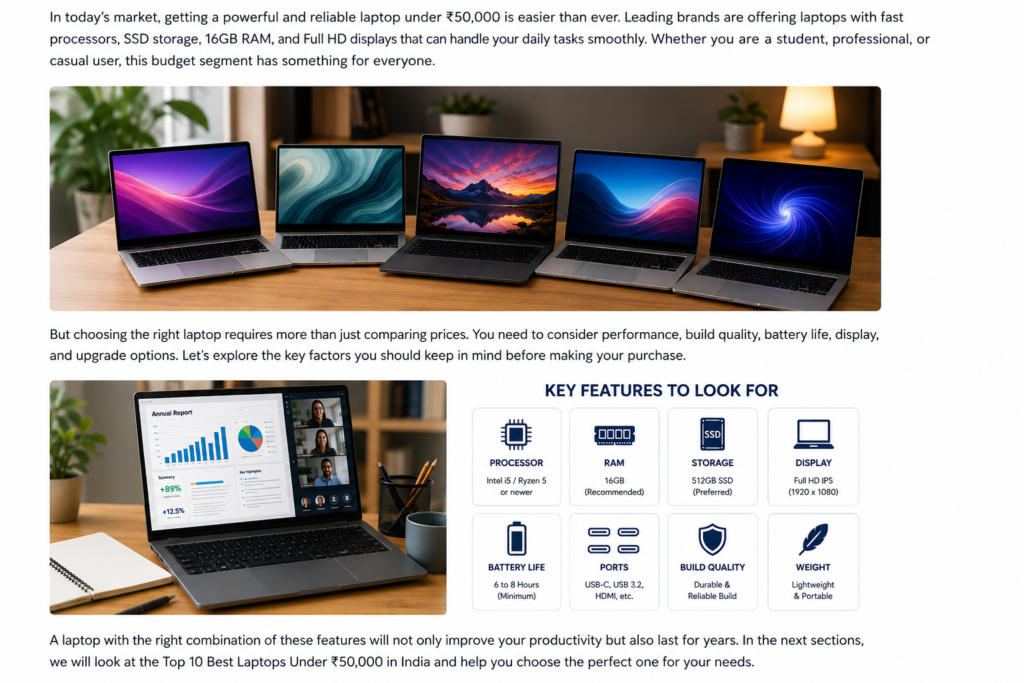
Choosing the Best Laptops Under ₹50,000 requires looking beyond the price tag. Understanding the core hardware components helps you avoid buying a laptop that may struggle after a year or two.
Processor
The processor is the brain of the laptop. In this budget, prioritize Intel Core i5 (12th or 13th Generation) or AMD Ryzen 5 (7000 series or newer, where available). These processors provide excellent speed for productivity, multitasking, and light creative work.
RAM
A minimum of 16GB RAM is recommended for smooth multitasking and better long-term performance. While some laptops still ship with 8GB RAM, choosing an upgradeable model gives you more flexibility in the future.
Storage
Always choose an SSD instead of a traditional hard drive. A 512GB NVMe SSD offers significantly faster boot times, quicker application launches, and an overall smoother computing experience.
Display
A Full HD (1920 × 1080) display is the minimum standard you should consider. An IPS panel provides better viewing angles, improved colors, and greater comfort for long working hours compared to older TN panels.
Battery Life
Look for laptops that can deliver at least 6–8 hours of battery life under regular usage. Good battery performance is especially important for students and professionals who travel frequently.
Build Quality
Even in the budget segment, sturdy construction matters. A durable hinge, comfortable keyboard, responsive touchpad, and lightweight design improve the overall experience and ensure the laptop lasts longer.
Connectivity
Modern connectivity options such as USB-C, USB 3.2, HDMI, Wi-Fi 6, Bluetooth 5.2, and a headphone jack make the laptop more versatile for daily use and future accessories.
Best Laptops Under ₹50,000 in India (2026)
Top 10 Best Laptops Under ₹50,000
| Rank | Laptop | Processor | RAM | Storage | Best For |
|---|---|---|---|---|---|
| 1 | ASUS Vivobook 15 | AMD Ryzen 5 | 16GB | 512GB SSD | Students & Office Work |
| 2 | Lenovo IdeaPad Slim 3 | Intel Core i5 | 16GB | 512GB SSD | Multitasking |
| 3 | HP 15s | AMD Ryzen 5 | 16GB | 512GB SSD | Daily Productivity |
| 4 | Dell Inspiron 15 | Intel Core i5 | 8GB (Upgradeable) | 512GB SSD | Business Users |
| 5 | Acer Aspire Lite | AMD Ryzen 5 | 16GB | 512GB SSD | Budget Buyers |
| 6 | ASUS Vivobook Go 15 | Ryzen 5 | 16GB | 512GB SSD | Students |
| 7 | Lenovo V15 | Intel Core i5 | 16GB | 512GB SSD | Office Work |
| 8 | HP Pavilion Aero | Ryzen 5 | 16GB | 512GB SSD | Lightweight Use |
| 9 | MSI Modern 14 | Intel Core i5 | 16GB | 512GB SSD | Professionals |
| 10 | Acer Aspire 5 | Intel Core i5 | 16GB | 512GB SSD | Everyday Computing |
1. ASUS Vivobook 15
The ASUS Vivobook 15 is one of the Best Laptops Under ₹50,000 because it combines excellent performance, modern hardware, and a lightweight design at an affordable price. It is an excellent choice for students, office professionals, programmers, and freelancers who need reliable day-to-day performance.
Powered by an AMD Ryzen 5 processor, this laptop delivers smooth multitasking, quick application loading, and efficient performance for productivity tasks. The 16GB RAM allows users to run multiple browser tabs, office applications, and communication tools simultaneously without noticeable slowdowns.
The 512GB NVMe SSD significantly improves system responsiveness. Windows boots within seconds, applications launch quickly, and file transfers are much faster compared to traditional hard drives.
The Full HD anti-glare display provides clear visuals for studying, working, streaming videos, and browsing the web. The lightweight body makes it easy to carry between college, office, or home.
Specifications
Processor: AMD Ryzen 5
RAM: 16GB DDR4
Storage: 512GB NVMe SSD
Display: 15.6-inch Full HD
Battery: Up to 8 Hours
Operating System: Windows 11
Pros
• Excellent performance
• Fast SSD
• Comfortable keyboard
• Lightweight design
• Good battery backup
Cons
• Speakers could be better
• Not designed for heavy AAA gaming
2. Lenovo IdeaPad Slim 3
The Lenovo IdeaPad Slim 3 is another excellent option in the Best Laptops Under ₹50,000 category. It is known for its reliable performance, comfortable keyboard, and durable build quality.
Powered by an Intel Core i5 processor, this laptop easily handles office work, online meetings, presentations, coding, web browsing, and multimedia consumption. Combined with 16GB RAM, users can multitask without experiencing lag during everyday use.
The laptop also includes a fast 512GB SSD that reduces boot times and improves overall responsiveness. Applications open quickly, and transferring large files becomes much easier.
The display offers vibrant colors and good viewing angles, making it suitable for watching videos, attending virtual classes, and editing documents for extended periods.
Specifications
Processor: Intel Core i5
RAM: 16GB
Storage: 512GB SSD
Display: 15.6-inch Full HD
Battery: Around 7 Hours
Operating System: Windows 11
Pros
• Excellent multitasking performance
• Premium keyboard
• Reliable build quality
• Fast SSD
• Good display quality
Cons
• Average webcam
• Basic speakers
3. HP 15s
The HP 15s is a popular laptop among students and office professionals due to its dependable performance and stylish design. If your daily tasks include Microsoft Office, web browsing, online classes, Zoom meetings, and content creation, this laptop offers excellent value.
Its AMD Ryzen 5 processor delivers smooth performance while keeping power consumption low. Combined with 16GB RAM, switching between applications remains effortless.
The Full HD display produces sharp text and comfortable viewing angles, making it suitable for reading documents, watching videos, and working for long hours.
HP also provides a comfortable keyboard and responsive touchpad, making typing easier during extended work sessions.
Pros
• Stylish design
• Smooth everyday performance
• Fast boot speed
• Comfortable keyboard
• Good battery life
Cons
• Limited gaming capability
• Speakers are average
4. Dell Inspiron 15
Dell Inspiron laptops are well known for reliability, strong customer support, and durable construction. The Dell Inspiron 15 continues that reputation by offering stable performance for office users and students.
The Intel Core i5 processor performs well for document editing, browsing, presentations, programming, and video conferencing. Although some variants include 8GB RAM, the memory can usually be upgraded later.
Dell’s display quality is comfortable for extended office work, while the keyboard offers a pleasant typing experience.
Business users often choose Dell because of its dependable after-sales service and long-term durability.
Pros
• Reliable performance
• Strong build quality
• Upgradeable RAM
• Good customer support
• Comfortable keyboard
Cons
• Slightly heavier than competitors
• Battery could be better
5. Acer Aspire Lite
The Acer Aspire Lite is designed for buyers looking for maximum performance without exceeding their budget. It combines a Ryzen 5 processor with fast SSD storage and sufficient RAM to deliver smooth everyday computing.
The lightweight design makes it ideal for students who frequently carry their laptop to college. Battery life is also respectable, allowing several hours of work on a single charge.
The Full HD display offers decent brightness and good clarity for watching videos, attending online classes, and completing assignments.
Pros
• Affordable pricing
• Lightweight design
• Fast SSD
• Good multitasking
• Modern connectivity options
Cons
• Plastic build
• Speakers could be louder
Quick Comparison
| Laptop | Office Work | Programming | Video Editing | Battery | Overall Rating |
|---|---|---|---|---|---|
| ASUS Vivobook 15 | ⭐⭐⭐⭐⭐ | ⭐⭐⭐⭐⭐ | ⭐⭐⭐⭐ | ⭐⭐⭐⭐⭐ | 9.6/10 |
| Lenovo IdeaPad Slim 3 | ⭐⭐⭐⭐⭐ | ⭐⭐⭐⭐⭐ | ⭐⭐⭐⭐ | ⭐⭐⭐⭐ | 9.5/10 |
| HP 15s | ⭐⭐⭐⭐⭐ | ⭐⭐⭐⭐ | ⭐⭐⭐ | ⭐⭐⭐⭐ | 9.3/10 |
| Dell Inspiron 15 | ⭐⭐⭐⭐ | ⭐⭐⭐⭐ | ⭐⭐⭐ | ⭐⭐⭐ | 9.1/10 |
| Acer Aspire Lite | ⭐⭐⭐⭐ | ⭐⭐⭐⭐ | ⭐⭐⭐ | ⭐⭐⭐⭐ | 9.0/10 |
Best Laptops Under ₹50,000 in India (2026)
6. ASUS Vivobook Go 15
The ASUS Vivobook Go 15 is an excellent choice for users looking for a stylish, lightweight, and reliable laptop without spending more than ₹50,000. It is designed for students, office professionals, bloggers, and remote workers who require a laptop that delivers consistent everyday performance.
Powered by an AMD Ryzen 5 processor, the laptop easily handles web browsing, Microsoft Office applications, online classes, programming, content writing, and entertainment. The 16GB RAM allows multiple applications and browser tabs to run simultaneously without slowing down the system.
The 512GB NVMe SSD ensures fast startup times and quick application loading. Users who frequently work with documents, presentations, PDFs, and cloud storage will appreciate the smooth experience.
Specifications
Processor: AMD Ryzen 5
RAM: 16GB DDR4
Storage: 512GB NVMe SSD
Display: 15.6-inch Full HD Anti-Glare
Battery: Up to 8 Hours
Operating System: Windows 11
Pros
• Lightweight design
• Fast boot speed
• Comfortable keyboard
• Excellent value for money
• Reliable daily performance
Cons
• Average speakers
• Not suitable for professional gaming
7. Lenovo V15
The Lenovo V15 is built for professionals and business users who need dependable performance throughout the day. It combines Intel Core i5 processing power with efficient cooling and a durable design.
Whether you work with spreadsheets, presentations, video meetings, or business software, the Lenovo V15 delivers a stable and responsive experience. The keyboard is comfortable for long typing sessions, making it suitable for writers, students, and office employees.
Specifications
Processor: Intel Core i5
RAM: 16GB
Storage: 512GB SSD
Display: 15.6-inch Full HD
Battery: Around 7 Hours
Operating System: Windows 11
Pros
• Durable build quality
• Comfortable keyboard
• Reliable office performance
• Fast SSD
• Good connectivity options
Cons
• Standard display brightness
• Average speaker quality
8. HP Pavilion Aero
If portability is your priority, the HP Pavilion Aero is worth considering whenever it is available near the ₹50,000 price during offers. Its lightweight chassis makes it ideal for students and professionals who travel frequently.
The Ryzen processor provides enough power for office work, programming, web browsing, online meetings, and multimedia. Combined with 16GB RAM, switching between applications feels smooth.
The display delivers sharp visuals with accurate colors, making it enjoyable for watching videos and editing documents.
Specifications
Processor: AMD Ryzen 5
RAM: 16GB
Storage: 512GB SSD
Display: Full HD IPS
Battery: Up to 8 Hours
Operating System: Windows 11
Pros
• Premium lightweight design
• Excellent display
• Good battery backup
• Fast performance
• Comfortable keyboard
Cons
• Availability depends on offers
• Limited upgrade options
9. MSI Modern 14
The MSI Modern 14 is designed for professionals, programmers, and college students who need portability without sacrificing performance.
Its Intel Core i5 processor and 16GB RAM provide enough power for coding, web development, office applications, and multitasking. The compact 14-inch design also makes it easier to carry compared to larger laptops.
The SSD ensures quick boot times, while the display offers good clarity for reading documents and watching videos.
Specifications
Processor: Intel Core i5
RAM: 16GB
Storage: 512GB SSD
Display: 14-inch Full HD
Battery: Around 7 Hours
Operating System: Windows 11
Pros
• Compact and lightweight
• Fast performance
• Excellent for programming
• Good keyboard
• Premium appearance
Cons
• Smaller display
• Not intended for heavy gaming
10. Acer Aspire 5
The Acer Aspire 5 continues to be one of the most balanced laptops in the budget category. It offers dependable performance, modern hardware, and a comfortable user experience.
Powered by an Intel Core i5 processor, it easily handles multitasking, office work, online learning, web browsing, and media consumption. The Full HD display provides clear visuals, while the SSD keeps the system responsive.
Its upgrade-friendly design is another advantage for users planning to increase RAM or storage in the future.
Specifications
Processor: Intel Core i5
RAM: 16GB
Storage: 512GB SSD
Display: 15.6-inch Full HD IPS
Battery: Up to 7 Hours
Operating System: Windows 11
Pros
• Reliable overall performance
• Upgrade-friendly
• Comfortable keyboard
• Good display quality
• Excellent value
Cons
• Plastic body
• Speakers are average
Performance Comparison
| Laptop | Office Work | Programming | Video Editing | Multitasking | Battery |
|---|---|---|---|---|---|
| ASUS Vivobook 15 | ⭐⭐⭐⭐⭐ | ⭐⭐⭐⭐⭐ | ⭐⭐⭐⭐ | ⭐⭐⭐⭐⭐ | ⭐⭐⭐⭐⭐ |
| Lenovo IdeaPad Slim 3 | ⭐⭐⭐⭐⭐ | ⭐⭐⭐⭐⭐ | ⭐⭐⭐⭐ | ⭐⭐⭐⭐⭐ | ⭐⭐⭐⭐ |
| HP 15s | ⭐⭐⭐⭐⭐ | ⭐⭐⭐⭐ | ⭐⭐⭐ | ⭐⭐⭐⭐ | ⭐⭐⭐⭐ |
| Dell Inspiron 15 | ⭐⭐⭐⭐ | ⭐⭐⭐⭐ | ⭐⭐⭐ | ⭐⭐⭐⭐ | ⭐⭐⭐ |
| Acer Aspire Lite | ⭐⭐⭐⭐ | ⭐⭐⭐⭐ | ⭐⭐⭐ | ⭐⭐⭐⭐ | ⭐⭐⭐⭐ |
| ASUS Vivobook Go 15 | ⭐⭐⭐⭐ | ⭐⭐⭐⭐ | ⭐⭐⭐ | ⭐⭐⭐⭐ | ⭐⭐⭐⭐ |
| Lenovo V15 | ⭐⭐⭐⭐⭐ | ⭐⭐⭐⭐ | ⭐⭐⭐ | ⭐⭐⭐⭐ | ⭐⭐⭐⭐ |
| HP Pavilion Aero | ⭐⭐⭐⭐⭐ | ⭐⭐⭐⭐⭐ | ⭐⭐⭐⭐ | ⭐⭐⭐⭐⭐ | ⭐⭐⭐⭐⭐ |
| MSI Modern 14 | ⭐⭐⭐⭐⭐ | ⭐⭐⭐⭐⭐ | ⭐⭐⭐⭐ | ⭐⭐⭐⭐⭐ | ⭐⭐⭐⭐ |
| Acer Aspire 5 | ⭐⭐⭐⭐⭐ | ⭐⭐⭐⭐ | ⭐⭐⭐ | ⭐⭐⭐⭐ | ⭐⭐⭐⭐ |
Which Laptop Is Best for Different Users?
Best for Students
- ASUS Vivobook 15
- Acer Aspire Lite
- Lenovo IdeaPad Slim 3
Best for Office Work
- Lenovo V15
- Dell Inspiron 15
- HP 15s
Best for Programming
- MSI Modern 14
- ASUS Vivobook 15
- Lenovo IdeaPad Slim 3
Best for Multitasking
- ASUS Vivobook 15
- HP Pavilion Aero
- Lenovo IdeaPad Slim 3
Best Battery Backup
- HP Pavilion Aero
- ASUS Vivobook 15
- Acer Aspire Lite
Best Overall Value
- ASUS Vivobook 15
Real-World Performance
In everyday use, all the laptops listed above can comfortably handle web browsing, Microsoft Office, online meetings, Full HD video streaming, and multitasking. Models with 16GB RAM and a 512GB NVMe SSD provide the smoothest experience, especially when many browser tabs or applications are open.
For programming, software development, and productivity tasks, laptops powered by AMD Ryzen 5 or Intel Core i5 processors offer more than enough performance for most users. Casual photo editing and light video editing are also possible, although professional 4K editing and heavy rendering are better suited to laptops with dedicated graphics cards.
If gaming is your priority, these laptops are suitable for esports titles such as Valorant, Counter-Strike 2, League of Legends, Dota 2, and Minecraft at medium settings. However, modern AAA games may require lower graphics settings because these models primarily rely on integrated graphics.
Overall, if your budget is limited to ₹50,000, choosing a laptop with a modern processor, 16GB RAM, and a fast SSD will provide the best long-term value and ensure a smooth experience for study, work, and everyday entertainment.
Best Laptops Under ₹50,000 in India (2026)
Complete Buying Guide
Choosing the Best Laptops Under ₹50,000 is not just about selecting the laptop with the highest specifications. You should always consider how you plan to use the laptop. A student, programmer, office employee, and casual gamer all have different requirements, so understanding your needs before purchasing is essential.
1. Choose the Right Processor
The processor determines the overall speed and responsiveness of your laptop. In this budget, you should look for:
- Intel Core i5 (12th Generation or newer)
- AMD Ryzen 5 (7000 Series or newer where available)
These processors can easily handle:
- Office work
- Online classes
- Programming
- Photo editing
- Video streaming
- Multitasking
Avoid older dual-core processors if you want your laptop to remain fast for several years.
2. RAM Matters
RAM affects how many applications you can use simultaneously.
Recommended:
- Minimum: 8GB
- Best Choice: 16GB
If your budget allows, always choose 16GB RAM or a laptop that supports future RAM upgrades.
3. SSD Storage
Storage speed is just as important as storage capacity.
Recommended:
- 512GB NVMe SSD
Benefits include:
- Faster boot times
- Faster file transfers
- Quick application loading
- Better overall system performance
Avoid buying laptops with only HDD storage.
4. Display Quality
Since you’ll spend hours looking at your laptop screen, display quality is very important.
Look for:
- Full HD (1920×1080)
- IPS Panel
- Anti-Glare Display
A good display improves productivity and reduces eye strain during long study or work sessions.
5. Battery Backup
A laptop should ideally provide:
- 6–8 hours of normal usage
Students and professionals who travel frequently should prioritize battery life.
6. Build Quality
A durable laptop lasts longer.
Check for:
- Strong hinges
- Comfortable keyboard
- Responsive touchpad
- Lightweight design
- Good cooling system
7. Ports and Connectivity
A modern laptop should include:
- USB Type-C
- USB 3.2 Ports
- HDMI
- Wi-Fi 6
- Bluetooth 5.2
- Audio Jack
These features improve compatibility with accessories and external devices.
Mistakes to Avoid
Many buyers make common mistakes while purchasing a budget laptop.
Avoid these mistakes:
- Buying only based on brand name
- Choosing HDD instead of SSD
- Ignoring RAM upgrade options
- Purchasing outdated processors
- Not checking display resolution
- Ignoring battery performance
- Skipping warranty details
- Buying without reading professional reviews
Frequently Asked Questions (FAQs)
Which is the Best Laptop Under ₹50,000 in India?
The ASUS Vivobook 15 is one of the best overall choices because it offers excellent performance, 16GB RAM, fast SSD storage, and good battery life at a competitive price.
Is ₹50,000 Enough for a Good Laptop?
Yes. Today, many laptops under ₹50,000 offer Intel Core i5 or AMD Ryzen 5 processors, 16GB RAM, and 512GB SSD storage, making them suitable for students, professionals, and everyday users.
Can I Play Games on These Laptops?
Yes. These laptops can run games like:
- Valorant
- Counter-Strike 2
- Minecraft
- League of Legends
- Dota 2
However, modern AAA games may require lower graphics settings because these laptops use integrated graphics.
Which Processor Is Better?
Both Intel Core i5 and AMD Ryzen 5 processors offer excellent performance. Your choice should depend on the specific laptop model, battery life, cooling, and overall value rather than the processor brand alone.
Is 8GB RAM Enough?
Yes, for basic tasks.
However, 16GB RAM is strongly recommended for:
- Programming
- Multitasking
- Video editing
- Future software updates
Which Brand Is Most Reliable?
Popular laptop brands include:
- ASUS
- Lenovo
- HP
- Dell
- Acer
- MSI
Each brand offers reliable options in this budget depending on the model.
Is SSD Better Than HDD?
Yes.
An SSD provides:
- Faster Windows startup
- Better multitasking
- Faster application loading
- Improved responsiveness
- Lower power consumption
Which Laptop Is Best for Students?
The ASUS Vivobook 15 and Lenovo IdeaPad Slim 3 are among the best choices for students due to their performance, battery life, and portability.
Final Verdict
Finding the Best Laptops Under ₹50,000 has become much easier because manufacturers now offer powerful hardware at affordable prices. Whether you are a student, office professional, programmer, freelancer, or casual user, there are several excellent options available within this budget.
Among all the laptops compared in this guide, the ASUS Vivobook 15 stands out as the best overall choice because of its strong Ryzen 5 processor, 16GB RAM, fast 512GB SSD, lightweight design, and dependable battery life. The Lenovo IdeaPad Slim 3 is another excellent alternative for users who prefer Intel processors, while the HP 15s, Dell Inspiron 15, Acer Aspire Lite, MSI Modern 14, Lenovo V15, HP Pavilion Aero, ASUS Vivobook Go 15, and Acer Aspire 5 all provide excellent value for different types of users.
Before making your final decision, compare processor performance, RAM, storage, display quality, battery backup, and warranty support. Investing in a laptop with modern hardware will ensure better performance, improved productivity, and a longer lifespan.
With the right choice, a laptop under ₹50,000 can easily meet your daily needs for study, work, entertainment, programming, and light creative tasks without exceeding your budget.